
Why this matters
OCR can recover text while losing the layout and business labels that give the text meaning. Databricks AI Functions enable AI powered document processing in the lakehouse, letting teams keep document structure, route by document type, and extract typed fields inside a governed document intelligence workflow. But reliable automation still depends on precise contracts, materialized stages, and field level validation.
What readers will take away
- A production oriented parse → classify → route → extract pattern using current response contracts.
- A reproducible notebook skeleton that materializes every billable AI stage.
- A compact two document smoke test, with its evidence and limitations stated explicitly.
- Controls for schema ambiguity, confidence, citations, error routing, cost, and evaluation.
Why is traditional OCR not enough for document intelligence?
Enterprise PDFs and Office documents carry meaning in tables, checkboxes, sections, captions, and the visual relationship between labels and values. Flattening a page to plain text may retain the words but discard the evidence needed to interpret them correctly.
| Approach | What it does well | Where the workflow must compensate |
|---|---|---|
| Traditional OCR | Text and coordinates | Layout semantics, document routing, typed fields |
| General model API | Flexible reasoning | Custom orchestration, output contracts, governance |
| Databricks AI Functions | SQL native parse, classify, and extract | Precise schemas, validation, review |
How do you build a materialized, governed document intelligence pipeline with Databricks AI Functions?
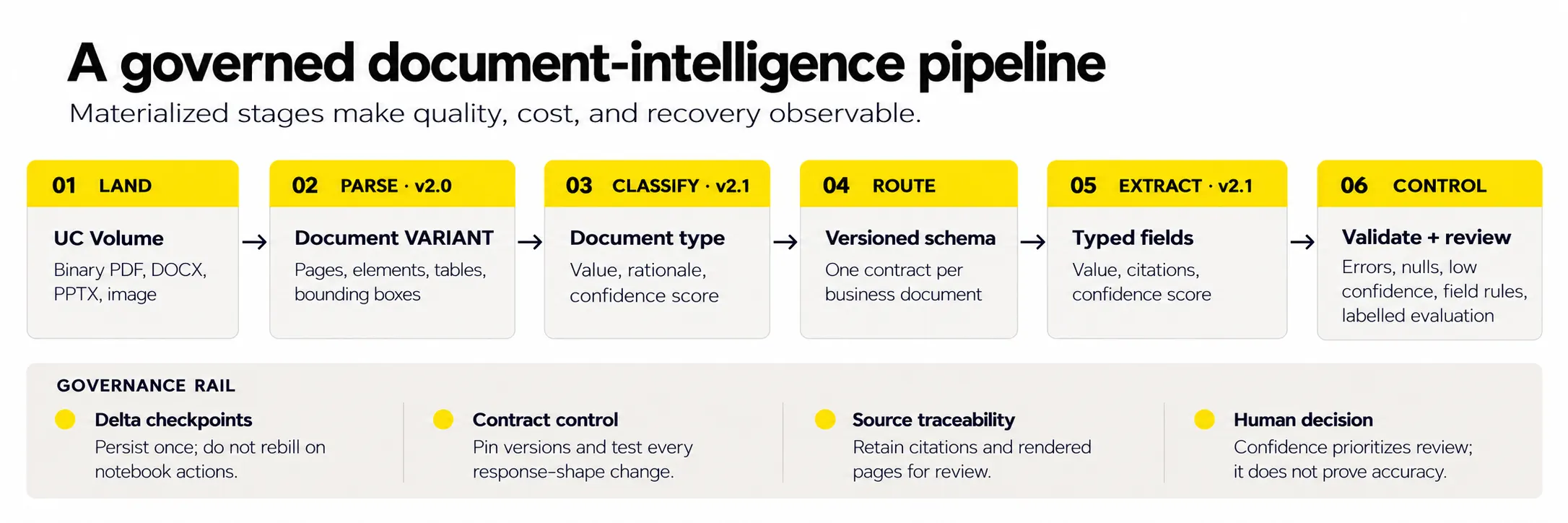
Databricks AI Functions: Prerequisites and response contracts
Prerequisites checked October 4, 2026
ai_parse_document requires Databricks Runtime 17.3 or later, on serverless it requires environment version 3 or later. ai_classify and ai_extract require Databricks Runtime 15.4 LTS or later, with 18.2 or later recommended. The latter two are not available on SQL Classic. Availability is region dependent, and AI Function calls are billable.
| Stage | Input | Pinned output | Use downstream |
|---|---|---|---|
| ai_parse_document | BINARY | VARIANT · v2.0 | document.elements, pages, error_status |
| ai_classify | STRING or parsed VARIANT | VARIANT · v2.1 | response[0].value + confidence + rationale |
| ai_extract | STRING or parsed VARIANT | VARIANT · v2.1 | field.value + confidence + citation_ids |
Four details that prevent subtle defects
- Pin each function independently. v2.0 and v2.1 are output contracts, not one pipeline wide version.
- For ai_classify v2.1, read response[0].value, the response is no longer a simple label array.
- For ai_extract v2.1, each field is a wrapper containing value and optional confidence/citation data.
- Set imageOutputPath during parsing when reviewers need rendered pages for bounding box citations.
Security boundary
Databricks states that inputs to these functions are processed within the Databricks security perimeter and are not stored as function inputs. Teams must still apply Unity Catalog permissions, data classification policy, retention controls, and approved regional deployment requirements.
Step 1: Parse documents with Databricks AI Functions
Keep paths and table names configurable, create run scoped checkpoints, and materialize immediately after every AI call. The example below is runnable after replacing the angle bracket placeholders with catalog, schema, and volume names.
import json
from uuid import uuid4
from pyspark.sql import functions as F
from pyspark.sql.functions import expr

SOURCE_PATH = "/Volumes/<catalog>/<schema>/<volume>/documents/"
IMAGE_PATH = "/Volumes/<catalog>/<schema>/<volume>/rendered_pages/"
RUN_ID = uuid4().hex[:8]
PREFIX = "<catalog>.<schema>"

PARSED_TABLE = f"{PREFIX}.parsed_docs_{RUN_ID}"
CLASSIFIED_TABLE = f"{PREFIX}.classified_docs_{RUN_ID}"
EXTRACTED_TABLE = f"{PREFIX}.extracted_docs_{RUN_ID}"

def sql_literal(value: str) -> str:
    escaped = value.replace("\\", "\\\\").replace("'", "''")
    return "'" + escaped + "'"
Why materialize now?
Notebook display, count, write, or downstream actions can reevaluate a lazy DataFrame. Persisting the parse result once prevents accidental repeated calls and creates a restart boundary.
files = (
  spark.read.format("binaryFile")
  .load(SOURCE_PATH)
  .select("path", "modificationTime", "length", "content")
)

parse_options = (
  "map('version','2.0',"
  f"'imageOutputPath',{sql_literal(IMAGE_PATH)},"
  "'descriptionElementTypes','')"
)

parsed = files.withColumn(
  "parsed_document",
  expr(f"ai_parse_document(content, {parse_options})")
).drop("content")

parsed.write.mode("overwrite").saveAsTable(PARSED_TABLE)

valid_parsed = spark.table(PARSED_TABLE).filter("""
  coalesce(
    size(variant_get(
      parsed_document, '$.error_status', 'ARRAY<VARIANT>'
    )), 0
  ) = 0
""")
Step 2: Classify documents with ai_classify
Descriptions make the labels operationally distinct. Keep multilabel disabled when one extraction schema must be selected, and retain rationale and confidence only as review signals.
LABELS = {
  "financial_statements":
    "A set of financial statements with reporting periods.",
  "sec_form_144":
    "SEC Form 144: notice of a proposed sale of securities.",
  "other_document":
    "Any document that does not match the two supported classes."
}
labels_json = sql_literal(json.dumps(LABELS))

classified = valid_parsed.withColumn(
  "classification",
  expr(f"""
    ai_classify(
      parsed_document,
      {labels_json},
      map(
        'version','2.1',
        'multilabel','false',
        'enableConfidenceScores','true',
        'enableRationales','true'
      )
    )
  """)
).withColumn(
  "doc_type",
  expr("variant_get(classification,"
       "'$.response[0].value','STRING')")
).withColumn(
  "class_confidence",
  expr("variant_get(classification,"
       "'$.response[0].confidence_score','DOUBLE')")
)

classified.write.mode("overwrite").saveAsTable(CLASSIFIED_TABLE)
Use compact, field specific schemas
The complete experiment evaluated 23 scalar fields. For readability, the excerpt below shows four representative fields per class. The companion notebook should contain the complete schema used for the reported results.
SCHEMAS = {
  "financial_statements": {
    "net_income_2002": {
      "type": "number",
      "description": "Net income for the year ended 2002."
    },
    "total_assets_2002": {
      "type": "number",
      "description": "Total assets for the year ended 2002."
    },
    "total_equity_2001": {
      "type": "number",
      "description": "Total equity for 2001; preserve a minus sign."
    },
    "currency_and_scale": {
      "type": "string",
      "description": "Explicitly stated currency and scale; null if absent."
    }
  },
  "sec_form_144": {
    "issuer_name": {
      "type": "string",
      "description": "Exact value in the Name of Issuer field."
    },
    "shares_proposed_for_sale": {"type": "integer"},
    "nothing_to_report": {
      "type": "boolean",
      "description": "Whether the Nothing to Report checkbox is selected."
    },
    "person_for_whose_account_securities_are_to_be_sold": {
      "type": "string",
      "description": "Exact value under the full printed field label."
    }
  }
}
Step 3: Extract structured data with ai_extract
The extraction output remains VARIANT, so differently shaped class results can share one table. Project typed business columns only after the response is safely persisted.
from functools import reduce

classified = spark.table(CLASSIFIED_TABLE)
routes = []

for doc_type, schema in SCHEMAS.items():
    schema_sql = sql_literal(json.dumps(schema))
    route = (
      classified.filter(F.col("doc_type") == doc_type)
      .withColumn(
        "extraction",
        expr(f"""
          ai_extract(
            parsed_document,
            {schema_sql},
            map(
              'version','2.1',
              'mode','precision',
              'enableCitations','true',
              'enableConfidenceScores','true'
            )
          )
        """)
      )
    )
    routes.append(route)

extracted = reduce(
  lambda left, right: left.unionByName(right),
  routes
)
extracted.write.mode("overwrite").saveAsTable(EXTRACTED_TABLE)
Project typed outputs and build a review queue
results = spark.table(EXTRACTED_TABLE).select(
  "path",
  "doc_type",
  expr("""
    variant_get(
      extraction, '$.response.issuer_name.value', 'STRING'
    )
  """).alias("issuer_name"),
  expr("""
    variant_get(
      extraction, '$.response.issuer_name.citation_ids', 'ARRAY<INT>'
    )
  """).alias("issuer_name_citation_ids"),
  expr("""
    variant_get(
      extraction,
      '$.response.shares_proposed_for_sale.value',
      'BIGINT'
    )
  """).alias("shares_proposed_for_sale"),
  expr("""
    variant_get(
      extraction,
      '$.response.shares_proposed_for_sale.citation_ids',
      'ARRAY<INT>'
    )
  """).alias("shares_proposed_for_sale_citation_ids"),
  expr("""
    variant_get(
      extraction, '$.metadata.citations', 'ARRAY<VARIANT>'
    )
  """).alias("citation_metadata"),
  expr("""
    variant_get(extraction, '$.error_message', 'STRING')
  """).alias("extract_error")
)

parse_reviews = (
  spark.table(PARSED_TABLE)
  .filter(expr("""
    coalesce(size(variant_get(
      parsed_document, '$.error_status', 'ARRAY<VARIANT>'
    )), 0) > 0
  """))
  .select(
    "path",
    F.lit("parse_error").alias("review_reason")
  )
)

classification_reviews = (
  spark.table(CLASSIFIED_TABLE)
  .withColumn(
    "classification_error",
    expr("""
      variant_get(classification, '$.error_message', 'STRING')
    """)
  )
  .filter(
    F.col("classification_error").isNotNull()
    | F.col("doc_type").isNull()
    | (F.col("doc_type") == "other_document")
  )
  .select(
    "path",
    F.lit("classification_or_routing").alias("review_reason")
  )
)

extraction_reviews = (
  results
  .filter(
    F.col("extract_error").isNotNull()
    | (
      (F.col("doc_type") == "sec_form_144")
      & (
        F.col("issuer_name").isNull()
        | F.col("shares_proposed_for_sale").isNull()
      )
    )
  )
  .select(
    "path",
    F.lit("extraction_error_or_missing_field").alias("review_reason")
  )
)

review_queue = (
  parse_reviews
  .unionByName(classification_reviews)
  .unionByName(extraction_reviews)
)
Do not stop at error_message
Production review logic should also include parse errors, nulls in required fields, class specific business rules, unsupported classes, and thresholds derived from labeled validation:not an arbitrary confidence cutoff.
What did the document intelligence experiment reveal?
In a two document smoke test using Databricks AI Functions, both documents were classified as expected, and manual review confirmed that 22 of 23 extracted scalar fields matched their sources. One field mapping error highlighted why schema precision and source level validation remain essential.
The test used one public sample financial statement and one public SEC Form 144. This is a smoke test of the workflow, not a benchmark, accuracy claim, or production acceptance result.
documents classified as expected
scalar fields matched on manual review
schema definition issue found
| Financial statement field | 2002 | 2001 | Observed behavior |
|---|---|---|---|
| Net income | 78,516 | 8,810 | Both reporting periods retained |
| Total assets | 276,498 | 331,259 | Year alignment retained |
| Total liabilities | 259,331 | 392,608 | Typed numeric values |
| Total equity | 17,167 | −61,349 | Negative sign preserved |
| Currency and scale | null | null | Not explicitly declared in source |
| Form 144 field | Extracted value |
|---|---|
| Issuer | NEW YORK TIMES CO |
| Security class | Class A |
| Shares proposed for sale | 16,972 |
| Aggregate market value | 1,012,943.68 |
| Approximate sale date | 11/06/2025 |
| Exchange | NYSE |
| Nothing to Report | true |
| Signature name | Gerardo Ibarra Munoz |
Result boundary. “22 of 23” means manual agreement for scalar fields in these two documents only. The two expected classifications are similarly a smoke check, not a statistically meaningful classification metric.
The most valuable result was the one that failed
The initial schema defined filer_name as the person or entity filing the form. The submission contact name was blank, yet extraction returned KOPIT LEVIEN MEREDITH A. from a different field whose label was “Name of Person for Whose Account the Securities are To Be Sold.” The text was real, the mapping was wrong.
| Source label | Source value | Interpretation |
|---|---|---|
| Submission Contact Information : Name | [blank] | No value should be inferred |
| Name of Person for Whose Account the Securities are To Be Sold | KOPIT LEVIEN MEREDITH A. | Valid value for a different business field |
"person_for_whose_account_securities_are_to_be_sold": {
  "type": "string",
  "description": (
    "Exact value printed in the field labelled "
    "'Name of Person for Whose Account the Securities "
    "are To Be Sold.'"
  )
}
Confidence is not accuracy
A high confidence score can accompany a value taken from the wrong source label. Use confidence to prioritize review. Establish accuracy by comparing each business field with labeled truth, its intended source label, and:where required:the returned citation.
Evaluation that can support a production decision
| Layer | Measure | Decision it supports |
|---|---|---|
| Classification | Accuracy + macro-F1 on labeled classes | Routing quality and rare class risk |
| Extraction | Per field exact match / tolerance / null accuracy | Which fields may be automated |
| Traceability | Citation coverage and source label agreement | Whether a reviewer can verify a value |
| Operations | Latency, billable usage, failure and review rates | Capacity, cost, and service levels |
Production controls that matter
Materialize each AI stage
Persist parse, classify, and extract results before display or repeated actions. Make retries stage specific.
Treat versions as data contracts
Pin function versions and regression test response paths before upgrading.
Keep schemas close to source language
Use exact printed labels, data types, units, null rules, and valid enumerations.
Separate model signals from business truth
Validate class and field accuracy on labeled data, calibrate review thresholds by use case.
Retain source evidence
Store parsed VARIANT, extraction citations, page images where needed, and review decisions.
Route uncertainty explicitly
Create queues for errors, unknown classes, null required fields, rule failures, and low confidence cases.
Observe cost and latency
Track documents, pages, AI calls, billable usage, p50/p95 latency, and retries per stage.
Govern sensitive content
Use least privilege Unity Catalog access, approved regions, retention policy, and auditable outputs.
A pragmatic acceptance gate
- Approve automation per document class and per field:not once for the entire pipeline.
- Require a labeled holdout set large enough to cover layouts, periods, languages, and edge cases.
- Send material impact fields to human review until field level performance meets the agreed threshold.
- Re run the holdout suite after schema, function version, source layout, or policy changes.
Production ready document intelligence with Databricks AI Functions
Databricks AI Functions offer a direct path from binary documents to structured content, document classes, and typed fields without moving the document processing workflow outside the lakehouse. The important design choice is not simply to chain three functions. It is to make each stage durable, observable, and testable, and to preserve enough source evidence for a person to challenge the result.
The two document experiment demonstrates both sides of that proposition: most targeted fields matched their sources, and one confidently returned value exposed an imprecise schema. That failure is the production lesson. Good document intelligence combines model capability with explicit business contracts, labeled evaluation, Unity Catalog governance, and an accountable review path.
Recommended next step
Turn this notebook pattern into a repeatable job or Lakeflow pipeline, expand the labeled corpus by document class and layout, and set field specific acceptance and review criteria before enabling downstream automation.
References
2. Databricks: ai_classify : v2.1 options, response shape, compute availability, and limits
5. Databricks: AI Functions overview : function family, billing, and operational guidance
7. Sample financial statements : public sample document used for the financial statement values
Note. Databricks product behavior and availability can change. Verify the linked official documentation before implementation.