
Why this matters
Operational search often mixes intent ("money disappeared") with exact domain language ("Reg E"). Databricks Lakebase Search combines semantic vector search and BM25 keyword search in Postgres, retrieving results based on both meaning and exact terms. Reciprocal Rank Fusion (RRF) then combines the ranked results from both methods.
What readers will take away
- When semantic, keyword, or hybrid retrieval is the right choice.
- How to keep Databricks embedding generation separate from Lakebase SQL execution.
- How to build correct top K vector and BM25 candidate lists before applying RRF.
- How to evaluate retrieval quality with labeled queries and ranking metrics.
Why do enterprise applications need hybrid search?
Imagine a support analyst searching payment tickets with the query “Reg E dispute for money that disappeared from my account.” The request contains two signals: a precise regulatory term (Reg E) and an informal description of a missing funds problem.
Vector search is designed for meaning. It can connect “money disappeared” with text such as “funds are missing,” even when the words differ. BM25 keyword search is designed for term relevance. It is useful when rare identifiers, product names, error codes, or policy terms must influence ranking. Neither method is universally better, they fail differently.
Hybrid search keeps the two retrieval paths independent, takes a bounded top K list from each, and combines ranks rather than incomparable raw scores. That makes the design easier to reason about and avoids hand normalizing cosine distance and BM25 values.
Why use Databricks Lakebase for hybrid search?
Lakebase is Databricks managed Postgres for operational workloads and AI applications. It separates compute and storage for independent scaling and is designed to bring transactional and analytical workflows closer on the Databricks Data Intelligence Platform. Lakebase Search adds the lakebase_vector extension for approximate nearest neighbor retrieval and lakebase_text for BM25 ranking. Search stays close to live application rows, SQL filters, and joins. Data originating in the lakehouse can also be served through synced tables. In Databricks' VectorDBBench test on 100 million vectors, Lakebase delivered twice the throughput of the next best system and one quarter the cost of a cloud Postgres vendor using pgvector, while sustaining 97% recall at 71 ms P99 latency. Those figures describe a Databricks vector benchmark, not the hybrid search quality demonstrated in this example.
Product fit note
Choose Lakebase Search when operational data and search need to live in the same Postgres system and you want SQL level control. Consider Databricks AI Search when you prefer a managed retrieval engine with less manual tuning.
How does hybrid search work in Databricks Lakebase?
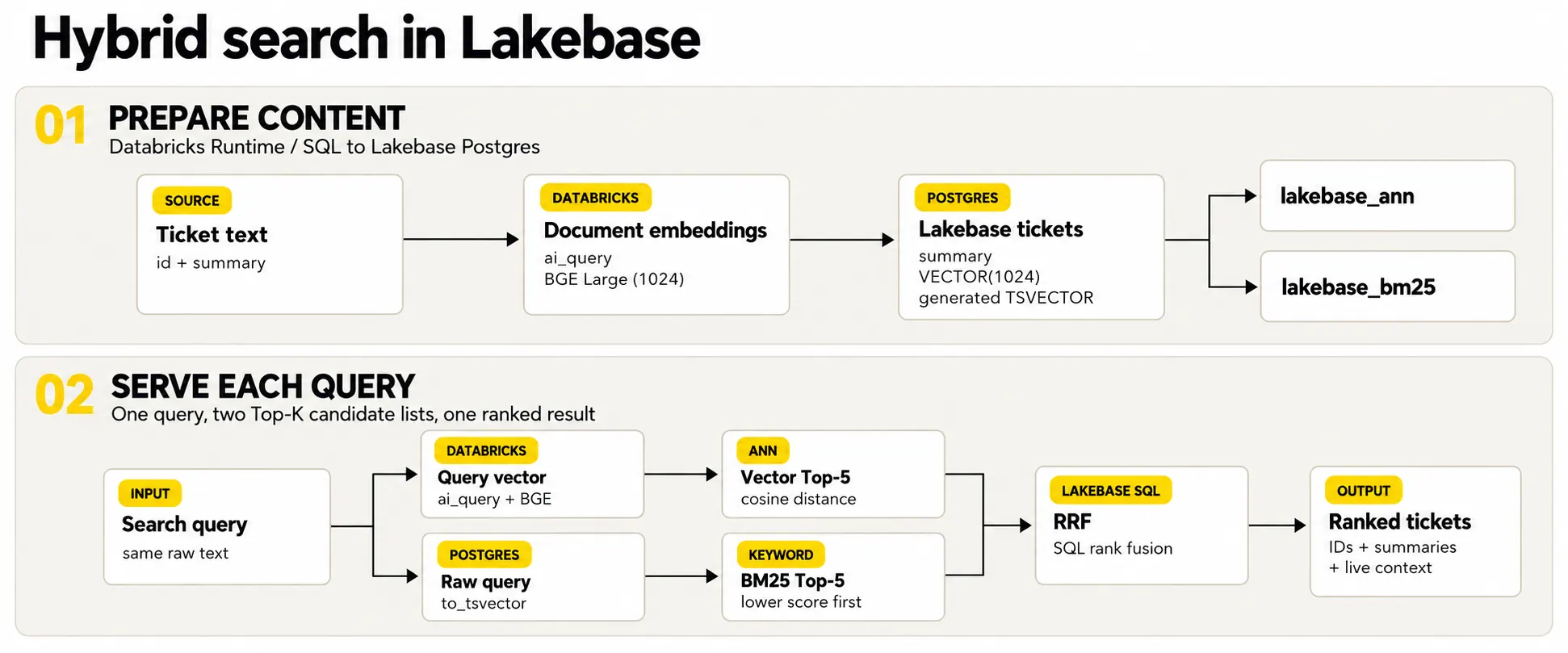
How to read the rankings
- Vector: lower cosine distance is better for semantic similarity.
- BM25: lower (more negative) score is better, sort ascending.
- Hybrid RRF: higher fused score is better.
Building hybrid search in Databricks Lakebase: Step by step
Prerequisites and impact
Use Postgres 16 or later. In Lakebase project Settings, enable Lakebase Search before creating extensions, this restarts project computes, drops active connections, and cannot be reversed. ai_query requires Databricks Runtime 15.4 LTS or later (18.2 or later is recommended), or supported Databricks SQL compute, it is not available on SQL Classic. The authoring identity also needs access to the model endpoint and database objects.
Run this setup before creating the corpus or embeddings. It uses the ARM serverless driver fallback described in “What to watch out for.”
# SETUP — install dependencies, then restart Python
%pip uninstall -y psycopg-binary
%pip install -q "databricks-sdk" "psycopg>=3.2"
dbutils.library.restartPython()
1: Create a small, explicit test corpus
The completed smoke test uses the original 16 support ticket summaries with stable integer IDs. The temporary view is required because the next step runs Spark SQL against it.
from pyspark.sql.types import StructType, StructField, StringType, IntegerType

tickets = [
  (1,  "Reg E dispute filed for unauthorized $340 charge, pending investigation"),
  (2,  "Money just disappeared from my checking account overnight, I didn't authorize this"),
  (3,  "ACH return processed for insufficient funds, customer requesting Reg E provisional credit"),
  (4,  "Wire transfer recall initiated for suspected fraudulent beneficiary account"),
  (5,  "Card-not-present fraud claim filed, cardholder disputes three transactions"),
  (6,  "I got paid twice this month by accident, need the extra deposit taken back"),
  (7,  "Zelle payment sent to wrong person, need to get my money back"),
  (8,  "My debit card stopped working out of nowhere at the grocery store"),
  (9,  "KYC documentation review required for account per BSA compliance"),
  (10, "Overdraft fees applied incorrectly, requesting reversal per Regulation DD disclosure"),
  (11, "Cant login to my account, keeps saying wrong password even though its right"),
  (12, "I sent money internationally three days ago and it still hasnt arrived"),
  (13, "Suspicious activity alert triggered on account, POS transactions in multiple states"),
  (14, "I deposited a big check and the bank is holding onto the money for a while"),
  (15, "Customer disputing recurring subscription charge, requesting chargeback under Reg E"),
  (16, "My statement shows a charge I never made from some store I never heard of"),
]

schema = StructType([
  StructField("id", IntegerType(), True),
  StructField("summary", StringType(), True),
])

tickets_df = spark.createDataFrame(tickets, schema)
tickets_df.createOrReplaceTempView("tickets_source")
2: Generate vector embeddings with Databricks AI Functions
The BGE Large endpoint produces 1,024-dimensional embeddings. The VECTOR column in Lakebase uses the same dimension. ai_query runs in Databricks, not inside Lakebase PostgreSQL, so the completed run materialized 16 document embeddings once and generated the vector query embedding before database retrieval.
MODEL_ENDPOINT = "databricks-bge-large-en"
VECTOR_QUERY_TEXT = "money disappeared from my account overnight"
KEYWORD_QUERY_TEXT = "reg e"

embeddings_df = spark.sql(f"""
  SELECT id, summary,
         ai_query('{MODEL_ENDPOINT}', summary) AS embedding
  FROM tickets_source
""")

# Materialize the billable model call once and reuse these rows.
embedding_rows = embeddings_df.collect()

query_vector = spark.sql(f"""
  SELECT ai_query('{MODEL_ENDPOINT}', '{VECTOR_QUERY_TEXT}') AS embedding
""").first()["embedding"]

assert len(embedding_rows) == 16
assert len(query_vector) == 1024
Query design used in this run
The vector branch uses a natural language description, while BM25 uses the exact regulatory term “reg e,” making each retrieval path easy to inspect. A production implementation should decide whether both branches receive the same query or a documented rewrite.
3: Connect to Lakebase with a short lived OAuth token
The notebook connects to Lakebase using a short lived OAuth credential generated at runtime. Long running applications and connection pools must refresh the credential before it expires.
from databricks.sdk import WorkspaceClient
import psycopg

LAKEBASE_DATABASE = "databricks_postgres"
LAKEBASE_USERNAME = "<your Databricks identity>"
LAKEBASE_ENDPOINT = "projects/<project>/branches/<branch>/endpoints/<endpoint>"

w = WorkspaceClient()
endpoint = w.postgres.get_endpoint(name=LAKEBASE_ENDPOINT)
credential = w.postgres.generate_database_credential(endpoint=LAKEBASE_ENDPOINT)

conn = psycopg.connect(
  host=endpoint.status.hosts.host,
  port=5432,
  dbname=LAKEBASE_DATABASE,
  user=LAKEBASE_USERNAME,
  password=credential.token,
  sslmode="require",
  connect_timeout=30,
  autocommit=True,
)
4: Install the extensions and create a drift safe schema
A generated tsvector column keeps keyword search content synchronized whenever summary changes. The integer primary key preserves the source IDs instead of silently creating new serial values.
with conn.cursor() as cur:
    cur.execute("CREATE EXTENSION IF NOT EXISTS lakebase_vector CASCADE")
    cur.execute("CREATE EXTENSION IF NOT EXISTS lakebase_text")
    cur.execute("CREATE SCHEMA IF NOT EXISTS hybrid_search_demo")
    cur.execute("""
      CREATE TABLE IF NOT EXISTS hybrid_search_demo.tickets (
        id          INTEGER PRIMARY KEY,
        summary     TEXT NOT NULL,
        embedding   VECTOR(1024) NOT NULL,
        summary_tsv TSVECTOR GENERATED ALWAYS AS
          (to_tsvector('english', summary)) STORED
      )
    """)
5: Load the demo rows, then build both indexes
The completed run materialized 16 Spark rows once, loaded them with their original IDs, created both indexes, and ran VACUUM after the bulk load. This driver side path is appropriate only for the smoke test, use bulk ingestion or synced tables for production volume.
def as_vector_literal(values):
  return "[" + ",".join(str(float(v)) for v in values) + "]"

rows = [
  (int(r["id"]), r["summary"], as_vector_literal(r["embedding"]))
  for r in embedding_rows
]

with conn.transaction():
  with conn.cursor() as cur:
    cur.execute("TRUNCATE TABLE hybrid_search_demo.tickets")
    cur.executemany("""
      INSERT INTO hybrid_search_demo.tickets (id, summary, embedding)
      VALUES (%s, %s, %s::vector)
    """, rows)

with conn.cursor() as cur:
  cur.execute("""
    CREATE INDEX IF NOT EXISTS tickets_embedding_ann
    ON hybrid_search_demo.tickets
    USING lakebase_ann (embedding vector_cosine_ops)
  """)
  cur.execute("""
    CREATE INDEX IF NOT EXISTS tickets_summary_bm25
    ON hybrid_search_demo.tickets
    USING lakebase_bm25 (summary_tsv)
  """)
  cur.execute("VACUUM hybrid_search_demo.tickets")
  cur.execute("SELECT COUNT(*), COUNT(embedding) FROM hybrid_search_demo.tickets")
  loaded_rows, stored_embeddings = cur.fetchone()

assert (loaded_rows, stored_embeddings) == (16, 16)
Smoke test scope and storage check
The completed run stored 16 rows and 16 non null embeddings in databricks_postgres.hybrid_search_demo.tickets. The Lakebase Tables view must be set to the hybrid_search_demo schema. The table has tickets_pkey, tickets_embedding_ann, and tickets_summary_bm25. With only 16 rows, index usage and latency are not representative of production.
6: Compare vector search and BM25 keyword search results independently
The completed run used “money disappeared from my account overnight” for the vector branch and “reg e” for BM25, making the semantic and lexical behavior easy to inspect separately. Vector distance and negative BM25 scores both sort ascending.
query_vector_literal = as_vector_literal(query_vector)

vector_sql = """
SELECT id, summary, embedding <=> %s::vector AS distance
FROM hybrid_search_demo.tickets
ORDER BY distance, id
LIMIT 5
"""

keyword_sql = """
WITH scored AS (
  SELECT id, summary,
    summary_tsv <@> to_bm25query(
      to_tsvector('english', %s),
      'hybrid_search_demo.tickets_summary_bm25'::regclass
    ) AS score
  FROM hybrid_search_demo.tickets
)
SELECT id, summary, score
FROM scored
WHERE score < 0
ORDER BY score, id
LIMIT 5
"""

with conn.cursor() as cur:
  cur.execute(vector_sql, (query_vector_literal,))
  vector_results = cur.fetchall()
  cur.execute(keyword_sql, (KEYWORD_QUERY_TEXT,))
  keyword_results = cur.fetchall()
Observed vector and BM25 results
Vector query: “money disappeared from my account overnight”
| Rank | ID | Ticket summary | Distance |
|---|---|---|---|
| 1 | 2 | Money just disappeared from my checking account overnight, I didn't authorize this | 0.092081 |
| 2 | 14 | I deposited a big check and the bank is holding onto the money for a while | 0.303153 |
| 3 | 8 | My debit card stopped working out of nowhere at the grocery store | 0.314289 |
| 4 | 12 | I sent money internationally three days ago and it still hasnt arrived | 0.330430 |
| 5 | 6 | I got paid twice this month by accident, need the extra deposit taken back | 0.347939 |
BM25 query: “reg e”
| Rank | ID | Ticket summary | BM25 score |
|---|---|---|---|
| 1 | 1 | Reg E dispute filed for unauthorized $340 charge, pending investigation | -1.386294 |
| 2 | 3 | ACH return processed for insufficient funds, customer requesting Reg E provisional credit | -1.386294 |
| 3 | 15 | Customer disputing recurring subscription charge, requesting chargeback under Reg E | -1.386294 |
The vector branch surfaced the natural language paraphrase in ticket 2. BM25 returned the three tickets containing the exact “Reg E” term: 1, 3, and 15.
7: Fuse correctly bounded top K lists with Reciprocal Rank Fusion (RRF)
Each branch retrieves and limits its candidates independently before rank assignment. This run used 10 candidates per branch, ROW_NUMBER with ID as a deterministic tie breaker, an RRF constant of 60, and a final top five result. Tune these choices on a labeled production like corpus.
hybrid_sql = """
WITH vector_candidates AS (
  SELECT id, embedding <=> %s::vector AS distance
  FROM hybrid_search_demo.tickets
  ORDER BY distance, id
  LIMIT 10
),
vector_ranked AS (
  SELECT id, ROW_NUMBER() OVER (ORDER BY distance, id) AS rank
  FROM vector_candidates
),
keyword_scored AS (
  SELECT id, summary_tsv <@> to_bm25query(
    to_tsvector('english', %s),
    'hybrid_search_demo.tickets_summary_bm25'::regclass
  ) AS score
  FROM hybrid_search_demo.tickets
),
keyword_candidates AS (
  SELECT id, score FROM keyword_scored
  WHERE score < 0
  ORDER BY score, id
  LIMIT 10
),
keyword_ranked AS (
  SELECT id, ROW_NUMBER() OVER (ORDER BY score, id) AS rank
  FROM keyword_candidates
)
SELECT t.id, t.summary,
  COALESCE(1.0 / (60 + v.rank), 0)
  + COALESCE(1.0 / (60 + k.rank), 0) AS rrf_score,
  v.rank AS vector_rank,
  k.rank AS keyword_rank
FROM hybrid_search_demo.tickets t
LEFT JOIN vector_ranked v ON t.id = v.id
LEFT JOIN keyword_ranked k ON t.id = k.id
WHERE v.id IS NOT NULL OR k.id IS NOT NULL
ORDER BY rrf_score DESC, t.id
LIMIT 5
"""

with conn.cursor() as cur:
  cur.execute(hybrid_sql, (query_vector_literal, KEYWORD_QUERY_TEXT))
  hybrid_results = cur.fetchall()
Observed hybrid RRF top five
| Rank | ID | Ticket summary | RRF score | V rank | K rank |
|---|---|---|---|---|---|
| 1 | 3 | ACH return processed for insufficient funds, customer requesting Reg E provisional credit | 0.030415 | 10 | 2 |
| 2 | 1 | Reg E dispute filed for unauthorized $340 charge, pending investigation | 0.016393 | : | 1 |
| 3 | 2 | Money just disappeared from my checking account overnight, I didn't authorize this | 0.016393 | 1 | : |
| 4 | 14 | I deposited a big check and the bank is holding onto the money for a while | 0.016129 | 2 | : |
| 5 | 8 | My debit card stopped working out of nowhere at the grocery store | 0.015873 | 3 | : |
What did the hybrid search experiment show?
In a 16-ticket test, semantic vector search surfaced a natural language description of missing funds, while BM25 retrieved tickets containing the exact regulatory term "Reg E." Reciprocal Rank Fusion (RRF) combined the rankings, demonstrating how the two retrieval approaches complement each other.
Ticket 3 ranked first because both branches contributed: vector rank 10 and keyword rank 2. Tickets 1 and 2 each led one branch and received the same single branch score. Ticket 15 matched BM25 but tied the single branch contribution of vector rank-3 ticket 8, the final ID tie break placed ticket 8 first, leaving ticket 15 just outside the displayed top five. This is a cutoff effect, not a lost keyword match.
Evaluate hybrid search relevance and performance
Because this run uses different branch queries and only 16 tickets, treat the tables as observed retrieval outputs rather than comparative accuracy results. For a production comparison, run vector, BM25, and hybrid retrieval over the same labeled query set:or a documented query rewrite strategy:and use the same top K value.
| Example query | Candidate relevant IDs | Why it helps |
|---|---|---|
| money disappeared from my account overnight | 2 | Matches the completed vector query intent |
| reg e | 1, 3, 15 | Matches the completed BM25 exact term query |
| sent money to the wrong person | 4, 7 | Tests payment recovery intent |
| international transfer has not arrived | 12 | Tests delay wording |
| charge I never made | 5, 16 | Tests unrecognized transaction intent |
Before using these labels for evaluation, have a banking domain reviewer validate the relevance judgments.
Use quality and latency metrics together
Report Precision@K, Recall@K or Hit Rate@K, MRR or nDCG@K, and p50/p95/p99 latency. Also record index build time, storage, and freshness behavior. Quality and performance answer different questions, do not use a vendor vector benchmark as proof of hybrid quality on the application corpus.
| Metric | Question it answers | Report with |
|---|---|---|
| Precision@5 | How many returned tickets are relevant? | Query count and labeling method |
| Recall@5 / Hit Rate@5 | Did the first five include the expected tickets? | Relevant ID definition |
| MRR or nDCG@5 | How early and how well are relevant tickets ranked? | Binary or graded relevance |
| p50 / p95 / p99 latency | How consistently did each method respond? | Corpus, compute, filters, and run date |
Next Evaluation Step
Run the labeled query set through vector, BM25, and hybrid retrieval under the same conditions, then report the quality and latency metrics above.
What to watch out for
Serverless driver compatibility
Most environments can use psycopg-binary. In the ARM serverless environment used for validation, the binary package produced a native SIGABRT. If the same failure occurs, remove psycopg-binary before importing psycopg and use the pure Python package with the system libpq. Treat this as an environment specific fallback, not a general Lakebase requirement.
Keep BM25 statistics current
BM25 corpus statistics are calculated when the index is built and updated by VACUUM. After a large bulk load, run VACUUM on the table. For a table dedicated to text search, tune autovacuum insert thresholds for the write pattern. REINDEX is for an index storage format upgrade or other specific maintenance:not routine score refresh after data changes.
ALTER TABLE hybrid_search_demo.tickets
  SET (autovacuum_vacuum_insert_scale_factor = 0);
VACUUM hybrid_search_demo.tickets;
Separate notebook convenience from production ingestion
- Use stable keys and idempotent upserts so repeated loads do not create duplicates.
- Use bulk ingestion or synced tables for large corpora, do not collect millions of vectors on a notebook driver.
- Refresh short lived OAuth credentials in long running services and pools.
- Apply tenant and authorization filters inside SQL, benchmark filtered queries, not only global search.
- Version the embedding model and re embed consistently when the model or dimensions change.
- Log query text, selected IDs, latency, and user feedback with appropriate privacy controls.
- Close transient notebook connections when the run finishes, rotate OAuth credentials for pooled services.
Hybrid search in Lakebase: Key takeaways
Hybrid retrieval is useful when an application must understand both what a user means and which exact terms matter. The completed 16-ticket run verified the end to end hybrid search workflow in Databricks Lakebase: embeddings were generated once, stored with stable IDs, retrieved through vector and BM25 branches, and fused with RRF.
The implementation detail that matters most is discipline: bound each candidate list before fusion, sort BM25 scores in the correct direction, document whether both branches use the same query or a query rewrite, and validate the result on a labeled query set. That turns a functional smoke test into an evidence backed search design.
References
Databricks : Lakebase authentication
Databricks : ai_query function
Databricks : Foundation Model API supported models
Databricks Blog : Lakebase Search: full text and vector search for Postgres
Cormack, Clarke, and Büttcher : Reciprocal Rank Fusion
Product behavior, regional availability, and version requirements can change. Verify the linked Databricks documentation before implementation.